Node Fairness in Hyper-V Fail-over Cluster

This might be fairly short, which is good because its getting late and I have to work tomarrow. There is a thing called Cluster Node Fairness which is new for server 16. Basically it works the same way, from what im understanding (psst, thats a hyperlink) it will migrate VMs from overloaded machines to less resource started machines via live migration. At least according to the following exter from that website:

What is Node Fairness for Hyper-V? Node Fairness is a feature of Fail over Clustering (not Hyper-V) that will automatically Live Migrate guests away from an overloaded cluster node. Even though it is a Fail over Clustering feature, it only operates on Hyper-V virtual machines.

There is a question for this, hence the reason that I decided to blog like 10 words about it so lets get to that. I tried to find some YouTube videos but there wasn’t really anything useful that I could dig up. Any way, question as follows:

 photo CNF1_zps120vuyi0.png

 photo CNF2_zps0ebyyqcy.png

As you can tell, or at least to me, the wording in the answer dialog is not super clear. Its like this thing exists and so it exists jargon jargon jargon. So all it really does is this, if you have a fail over Hyper-V cluster it will drain and live migrate an entire VM to another node. This is a super cool feature but as you would have to have an entire farm of Hyper-V machines I highly doubt I will see this in production. Really at this point I would like to do any thing on Server. Create user accounts that leave room for privilege escalation and see if they can figure out their domain rights and exploit it.
Just kidding that’s a terrible idea and a very bad infrastructure policy. Ethics aside, I really think that one link is all im getting out of this. I could post some TechNet links but they are fairly vanilla and not able to help as much as I would like for them to. However, I will leave you with this little nugget about Server 2019:

Failover-Clustering/Windows-Server-2019-Failover-Clustering-New-Feature

The best part is the guys hand gesture in the screen cap for every video. I have no idea whats going on there.

Cluster .. things

I’m slightly confused about some clustering things so I’m going to go over that tonight. Primarily Cluster OS rolling upgrade and Cluster-aware updating. I’m not terribly sure why this is so confusing to me but apparently it is. Cluster OS rolling upgrade is exactly what it sounds like but I’m a little hazy on the specifics and its new tech so I want to take a look at it. Here is the question followed by some relevant links.

 photo cluster 1_zpsknzllkzk.png

 photo cluster 2_zpscb9966y9.png

Cluster operating system rolling upgrade

Cluster aware upgrading is cool. Does what it says it should. Drains roles, removes the node, updates the node re-installs the node and re adds rolls. Its fail over clustering for upgrades. Seems effective but would like to see it in practice but probably wont because hard work isn’t really the key to success but none the less in enjoy learning and have learned to despise the questionably motivated social habits of most. Thus embracing a fatalistic sense of existence that I find entertaining while others stress over their lack of a sense of control of focusing on their own existence by worrying about making someone else realize they are better for some arbitrary reason that’s absolute absurdity. lol personal tangent about people who only have people in their lives for the purpose of making them feel more important. Any way. Lets move on to cluster aware updating.

Cluster Aware Updating

This is important for a few reasons but mainly high availability and transparency for highly available/mission critical applications, as described in the following:

For many clustered roles in the cluster, the automatic update process triggers a planned failover. This can cause a transient service interruption for connected clients. However, in the case of continuously available workloads, such as Hyper-V with live migration or file server with SMB Transparent Failover, Cluster-Aware Updating can coordinate cluster updates with no impact to the service availability.

Cluster storage spaces I’m really unclear on and I’m not sure why. It’s not a new feature but I don’t think I really hit it too hard in the last exam.

Storage Spaces direct

There is a lot to unpack there and I’m familiar with this. Apparently its an issue with nomenclature but the SAS and SOFS should be a dead give away for the Cluster 2. Anyway, I suppose that’s not too complicated. The storage spaces direct stuff is a lot to sort through but the article is pretty helpful and upon sorting through it quickly it would appear that not much has changed since the last time I looked at it. It’s getting late and I have to work in the morning so that’s all for now. I do have to say I’m finding that I’m picking up on this material pretty quickly. Meaning, I feel fairly comfortable with most of the MeasureUp stuff.

Windows Containers

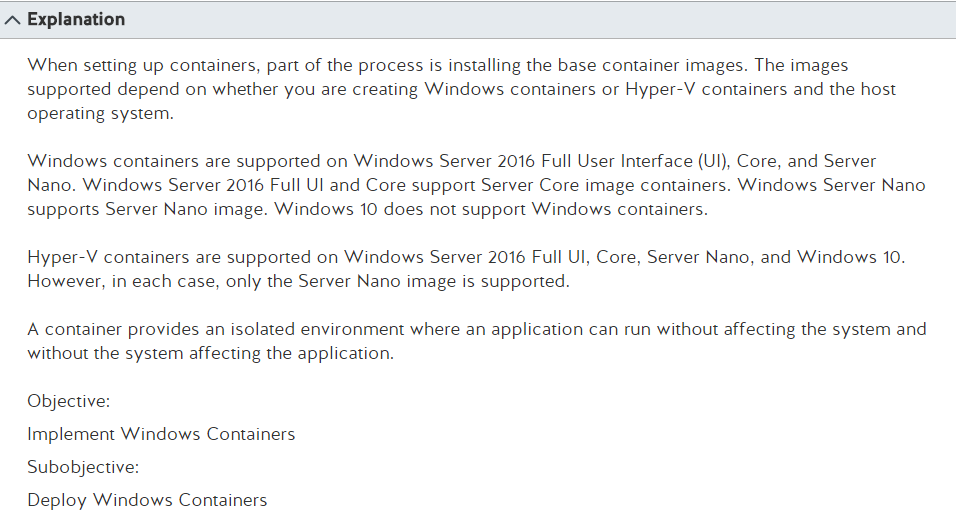
We are not done with containers yet. There are also Windows containers that are docker images running Windows as the host OS, from what I’m gathering and to add to the confusion you can throw Hyper-V in the mix, for some reason. I thought avoiding the resource usage of spinning up complete host images in a hypervisor was the entire point of containers? Currently, I’m not really sure but I’m excited to find out why you would use Hyper-V with a container. There are several questions on the MeasureUp info that are aliened with this but i’m going to quickly point out one for the sake of brevity. Ok maybe 2.
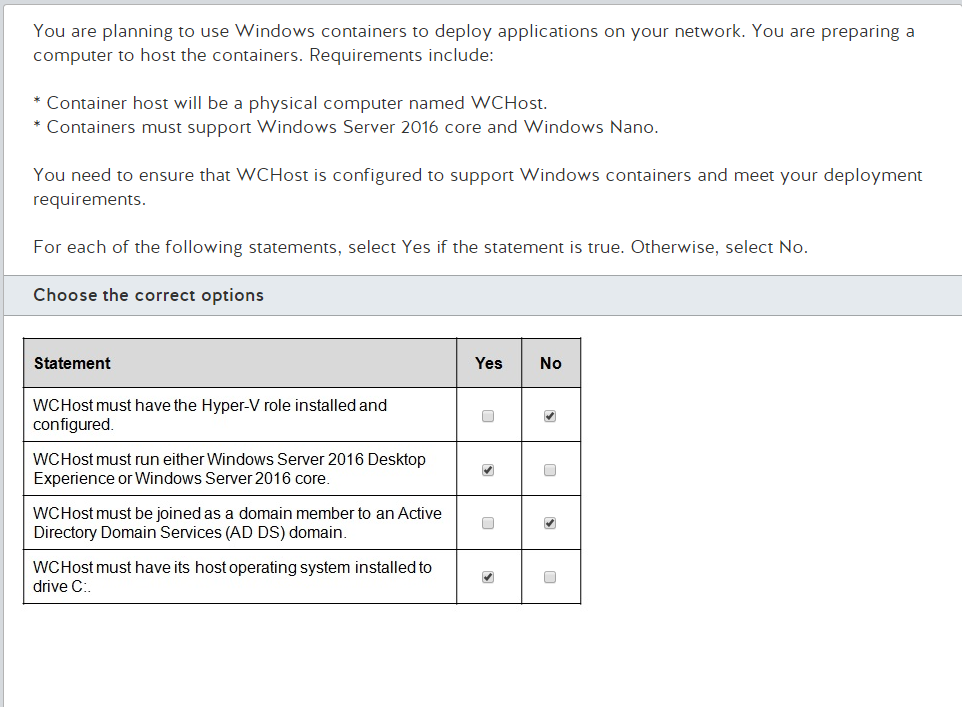
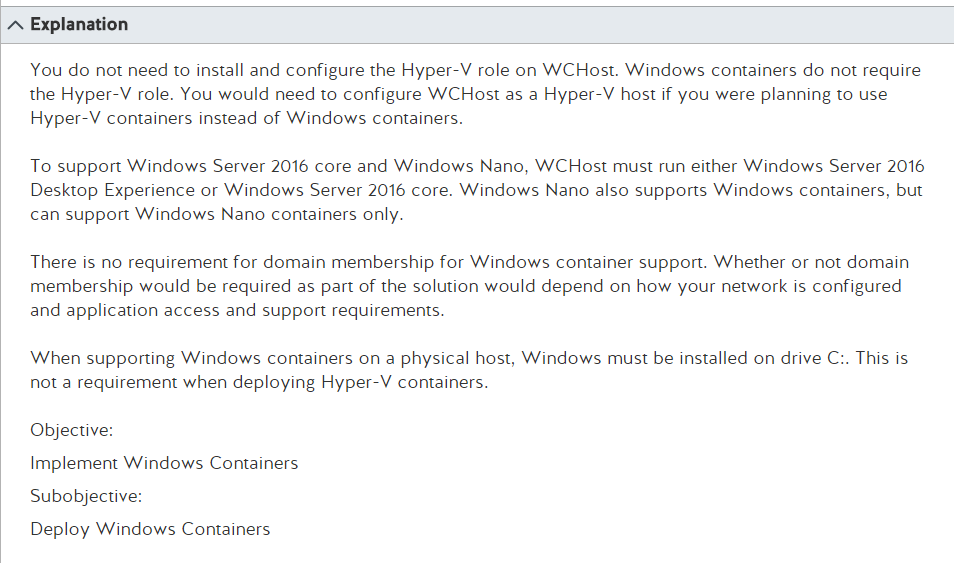
 photo install 1_zps2vacff5r.png

 photo install pt 2_zpstzsk54dg.png

Ok, … a Hyper-V container but like aren’t we talking about Docker a whole bunch? Ok, right.

Windows containers

Please click the link and then check this MSFT trainers apparent literal installation of a ‘MSFT Kitchen’ haha. He is awesome by the way. He was also very instrumental in me learning so much foundational knowledge for Server 2012. However, I’m starting to wonder if there is any foundational knowledge on this test. Regardless, at least they haven’t asked any sub-netting questions yet. Please don’t do that, in the future. Math is not for people that are really proficient at installing server roles and features.

ok, any way. This seems like a good place to start. Meaning the link, before I started rambling. Noted that the video is full of what I call ‘Papa’s Promise’. For those unfamiliar with food chain advertising its full of nonsense that makes people feel like its quality. I’m not saying its not a good product but like these rubik’s cube situations in the video really got me. The other thing is they try to stay away from admitting that they didn’t invent this technology like ‘Container orchestrator’ and ‘Docker’ are clearly not the same thing. They go to go great lengths to prove this….

 photo b81ae5c9d4dd1f1cd3d48ed777f12867--fun-stuff-memes_zpsofbvqmrp.jpg

never gets old

Ok, so I have to say, I was on twitter the entire time it was playing, but the second video in this was immensely helpful as there some that actually does dev explaining this and the more I hear about it, its clear that some dev (well, this is the case with literally every thing in computers) was like ‘what if’ then followed up with a ‘hold my beer’ and gutted OS’s to bare bones and figured out a way to strip a VM down the bare bones for the hell of it. Honestly, who cares if company’s have to buy more hardware resources than they need to. I promise you the people that decided to do this did this because they thought it was fun. Or it was someone at a start up. Anyway, I mean, I don’t know much about ‘computer man’ culture but just taking a stab in the dark here. Ok, now to finish that first sentence with the hold my beer, so yeah like lets strip a VM down and make it run without the use of a hypervisor on a baseline application that runs faster and uses less resources because we have to get to 88 mph. Man, im starting to sound like the nomenclature when trying to listen to dev talk about ‘you see what we did here was strap this jownson outboard on the back of this there wheel barrow and on account of having more room in the main spot ‘dare we went ahead and put this turbo on it that Steve had done welded up the exhawst plumin for this thing on account of it being sat-er-dee and being bored. I know your thinking ‘you cant put a turbo on a damn 2 stroke’ but i tell uns what, we did’ kind of thing. Then the MSFT guy comes in and is like ‘and we here are msft are mad that we didnt think of putting a johnson outboard motor in a wheel barrow so we went ahead a bought a really fancy one. the two stroke with the turbo might be a bit much but we have this ‘proven’ motor that we may be able to repackage as its been tested for commercial use’ kind of thing. Ok, so I like containers. This is fun. And no, I did not grow up around red necks that would do that sort of thing in the out skirts of Atlanta in somewhat rural area with a father that worked on cars for a living, thanks for asking. Anyway, besides the initial excitement of hearing someone who builds these things discuss implementing and testing hot fixes in a sandbox type environment with an even lighter weight product than a virtual machine to blow up and rebuild, I still have no idea what Hyper-V is doing in this. Using Nano server and so forth to build a container image upon makes sense but i’m still in for more reading as to not, why (we figured that one out…), but how we are using Hyper-V with…containers…which are supposed to avoid having a complete VM. So, lets get to that.

Hyper-V container

Hyper-V isolation – multiple container instances can run concurrently on a host, however, each container runs inside of a special virtual machine. This provides kernel level isolation between each container as well as the container host.

 photo Face-You-Make-Robert-Downey-Jr_zpscctzvfd1.jpg

So basically what your saying is its, plausibly more armored (its not) but uses more resources? Ok, I’ll go with it and memorize the answers. My favorite part is that examples are PowerShell cmds in the article haha ok. There is also the factor of using Hyper-V makes people think these are VMs, a highly confusing thing, which they are not. Thinking in that fashion will do you no favors.

Windows Server 2016: Windows Containers vs. Hyper-V Containers

Now they want to get specific. Good. Lets check out this applesauce, I hope it has cinnamon in it because that’s the best kind.

This is now starting to make sense as it provides kernel isolation with Hyper-V to ensure that OS updates don’t break the code. However, this can be mitigated easily by sand-boxing OS updates and updating code accordingly. Which is common practice. Besides if you update and break it apparently takes less time to spin up an new instance of the same container. So I’m not exactly clear on specific instances of why one would actually need to use this in production. MSFT is starting to see that, “starting” (lol), to see that Linux servers are easier to maintain as web servers and not to mention cheaper. It’s an important market share to not miss out on however most of the people that are actually building things out like this cannot afford to buy a server data center license for their home brew shit. I feel like there is an apple joke about monitor stand coming into play. Right about, now.
 photo 1FA41FE6-8AA3-4A71-8A44-8D2A94B89FE4_zpsjrewjl3z.jpg

Its an important market share and I understand it. I’m honestly not convenienced on the need for the tech tough.

So this is an interesting link that is one this second question that I’m finally getting around to posting. Now that I have successfully discussed every thing but the actual answer to the previous question. Its sort of what I do, sorry. Oh, its also somewhat related to the other question. Any way here is that link

Windows container requirements
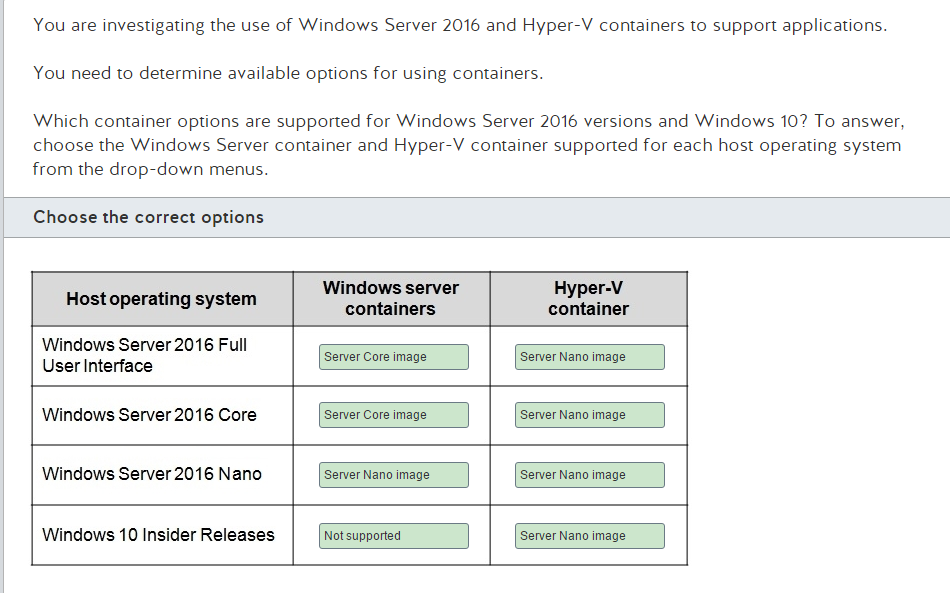
 photo containers_zpsx47bvtun.png

 photo containers pt 2_zps3dxhqbuk.png

Specifically the table in that article basically contains the answers. Now that we have figured out the why, knowing the answer without know why isn’t fucking annoying. The interesting part is that they very clearly state the difference in sizes of the containers I’m realizing that compared to a file size of well over a gig for a full VM this isnt that bad.

Nano Server (os only) 40 MB (Hyper-V install) 130 MB + 1 GB Pagefile

Until you get to that paging file bullshit. Come on, really? There is some further information thats interesting but I’m not that clear on actual app building and dlls and slimmed down versions of .NET (lol) so I’m going to stick with what we’ve got. I do honestly feel like I now understand the differences and am happy to memorize answers to things that I have a grasp on the concept of the technology.

Docker Storage Types

Docker storage is beyond confusing. There is more jargon and nonsense technical terms than a football locker room. I’m not sure if that makes sense but lets just go with it. I’ve been reading articles all week and I think I sort of understand this “persistent memory” thing. Most of the videos are related to actually spinning up containers for use by developers. And lets be honest, who wants to be a developer? I mean typing shit out all day because you think its fun and then seeing it run in production and being like ‘I made that’ and having no one know that bit of code was you or care. Sounds fucking awful. Any way lets get into some stuff.

 photo container data storage pt 1_zps6ovfw5kj.png

 photo container data storage pt 2_zpslbm9rtnb.png

Ok, so first of all I keep hearing this thing about persistance and I have no idea what this is. So I watched a bunch of YouTube videos, none of which where helpful, so I’m going to link some articles that I found helpful in understanding that all of this documentation surrounding pulling a fucking file from an HD and writing to ram when using containers is full of so much nonsense jargon its almost insufferable. Like ok, i can write shit to ram in Linux but not windows. Right.

The other thing about this, a lot of what i’m finding that’s useful for conceptualizing is marketing material that’s requiring to read through product specific jargon.

Persistent Storage Strategies for Containers

This is basically marketing material as its for a coporate blog. As I read it I realize that I should probably spin up docker and build a bullshit website to spin up however, to be quite frank, obviously writing two lines of HTML and using different color backgrounds is way outside my scope. I go into server manager and click around until it does what I need it to lol. Ok, I could do this but im not sure it would be work the time for me. I mean, this isn’t a super cool CTF so why would I learn anything about it. It too me 6 months to figure out how to exit VIM. Build several containers that host a local site and use clustering with source code stored for each? That sounds like its outside of my wheelhouse. I guess I should also mention that this has nothing to do with the question I posted above. No worries…we will get to not finding an answer for that and discussing the hella meta ideas presented about Docker storage that seem like they are clearly designed to put the ball in devs court and confuse the ever loving hell out of management. Honestly, I’m absolutely ‘pro’ this concept. Like lets take every thing you know about computing and pretend is all absolutely false because we have just reinvented the wheel by figuring out a way to have services run in containers (that somehow have OS kernels but are not VMs) and use a shared source for serving up applications or use info contained in the container. I realize that contained in the container sounds absurd and to be honest, there are a lot of things that sound real dumb boiled down which plausibly led to over complicated lingo. That said, the spaghetti monster is alive and well in containers. So, here is my favorite thing from this article, this all makes sense:

    as always, the devil is in the details. In the case of containers and persistent storage:

  • The practical need for some kind of storage for use by the container. Many common software tasks use temporary storage. While it may be possible to design programs that perform those tasks without the need for persistent storage, doing so introduces unnecessary complications.
  • Prolonged use of individual containers. In practice, some containers remain in use for hours, or even longer. The longer a container remains in use, the greater the likelihood that it will need storage (as a scratchpad, to save state information, or for more complex purposes).
  • The need for containers to share data. This is a big one. Containers frequently need to work together, and working together generally means sharing data. The easiest and best way to share data is often by means of shared storage. Lack of such storage makes data sharing difficult.

So here is thing about this, what are each of these states of storage called? I’m not sure. At this point it seems like ‘persistant storage’ means avalible data. Like, wtf. Every application needs
this. Why are you confusing me with this new word. I’m still not clear on what it means and I think they made it up so that ‘kind ol’ southern folks’ such as myself would be confused. I’m pretty sure thats
true because devs are going to look at it and go lol you mean applications need to have access to data to serve things up? Wow, I did not know that. So then comes in this whole bit of what the hell they are
talking about at any given moment.

    Docker storage types

  • Docker Data Volumes
  • For storage by individual containers, Docker offers data volumes. These allow a container to use a kind of virtualized persistent storage abstracted from the host system’s storage. This virtualized storage is integrated into the standard container file structure, which makes access easy. Data volumes are, however, limited to an individual instance of a single container. The data can’t be shared with other containers, and it can’t be accessed by later instances of the same container.
  • Using the Host File System
  • There are other methods of persistent storage which make much more direct use of the host file system, setting aside some of the host system’s storage for use by the container without the layers of abstraction imposed by data volumes. This can, depending on the method used, allow data to be shared with other containers, or with later instances of the same container. If file and storage management are not fully coordinated between the container and the host system, however, data may be overwritten or corrupted

This information is immensely helpful. Unlike the 4-5 hours of YouTube videos I watched while trying to figure out what they where talking about. It seems really obvious and I’m not sure why this isn’t present in the articles linked from MeasureUp. This is why I pay you MeasureUp. I could have bought these sick shoes, mostly

 photo 957D9D9F-CC2D-4D17-B1C0-E99B37027AF3_zpsj4rpak72.png

 photo 222BE62F-AFB1-497D-9B66-F94DBBEAE628_zpsma2318po.jpg

Thats neither here nor there. But those shoes are sooo sick. So you should pay me so much money so I can be your offices Server High Roller. I’m sure this is extremely convincing as well as appealing. Jody has quality tastes. If your not familiar already, there isnt much point in this exercise in absurdity and modern art. Yes, I legit think he is a walking bit of modern art and commentary on peoples responses to things they are unclear on.

Ok, so now that ive informed you that the linked Docker documentation is garbage, that YouTube videos are for starter devs or execs pretending to be learning, and that (holy shit) applications require back-end data to be able to do anything, what the hell is going on in the linked question.

Glad you asked, Lets find out!

tmpf mount

ok so i said this was useless but really its just confusing as fuck with no baseline. Like what the fuck, no where in this does it mention Linux and I have to be running a linux kernel in the container to use this. That’s crazy but ok. the best part is its insisting that its writing to ram and not a HD. Like ok, so I can write to ram in Linux but not in windows. You guys are fucking with me aren’t you. Yep. Ok, that’s fine, that’s how it works. There are a lot of cmds here to use with docker around thing but we don’t really care. I want to be able to answer the question and know the why. At this point the how is outside my scope. Wait, but it says ‘not persisted’ what the fuck, it seems like all this is persisted. Ignore that, its a red herring. That’s my thought at least. I could be wrong here but we shall see haha. Any way the next part about being removed when its stopped, that’s important. This is a unique identifier to tmpfs mounts as its written to ram.

Volume mount

This is literal normal application storage on a hard disk that can be accessed by multiple docker containers or to put in other words, instances of your app server. The host core functionality bit is slightly confusing but again, I think this is red herring. The important part is its managed on the host. Obviously the services are going to be isolated from the host. That’s literally the entire point of containers. So the important part of this question is “in a directory on the host” and basically ignore any thing else. However, this bit is the difference between the last two answers “While bind mounts are dependent on the directory structure of the host machine, volumes are completely managed by Docker” I know what your thinking, why would they be so cruel? Welcome to server tests. Honestly, I enjoy the logic torture.

Bind mount

Basically this somehow calls on OS local APIs to be able to serve the data into the application and a volume mount does not otherwise its the same thing. Well, that’s my understanding.

So all that is clear as mud right? I don’t know what to say, its kind of a lot to wrap your brain around but its good stuff. Just read, stop obsessing over terminology your not familiar with and realize that maybe you understand a few things about computes. Perhaps the terms are tools more for communication than practical things.

Software Defined Networking

There is a lot to cover with Software Defined Networking (SDN) and I mean a lot. And after messing with VMs for a while and learning that setting up a simple pass-thru configuration or setting up an internal network on a hypervisor between two VMs using various hypervisior platforms, I can only imagine how complicated this gets in real world scenarios. Today we are just talking about MSFT stuff, thankfully. So we can dive into all kinds of theory without having to get into the practical application of this tech and seeing it fail because I don’t have way to simulate a full SDN that would require a load balancer and multiple apps. Super excited to learn about this stuff in theory though and be able to answer questions about installing this tech using PowerShell though. Gib me seber job plaz. I mean, I have a server job but I mean Windows Server administration. Anyway, so here is one question about this. I’m sure there are more….actually wait. First, a video….What is SDN in Server 2016…. lets find out!

I found this one helpful on account of skee ball machine and spray art. I’m assuming that if you get enough tickets on the skee ball machine you can hire and authentic spray artist to come and tag the side of your garage. On account of being urban. No seriously though this is one is really helpful. I’m slightly worried that the guy on the left might be murderous. (says the guy in the black metal shirt)

This one is also helpful al though he looses me a bit when completely circumvents the entire point of having a SLB by saying that a router in the VMS is going to do that. I mean he didn’t say a switch right? I’m not making this up right? Ok, good. Because he also talks about the outbound traffic skipping MUX SLB by going directly back the gateway. I mean, is there a reason why it wouldn’t go directly back to the gateway. Also, when you start watching the video your going to think “at any moment now I’m expecting this man to rip his shirt off and start punching a hole through that thing hes writing on.” Unfortunately, hes not really the punching type and every thing other than the MUX SLB stuff that I found a touch confusing in the later part of the video, I found it very helpful so I’m putting that in here as well.

So after spending like two hours or so of your day (didnt tally up the times on those bad bois) you now sort of have an idea of what they are talking about. It seems super complicated however when you start considering the amount of commerce that is done through web traffic its really completely reasonable and im starting to see a picture here of a solution for web applications hosting from the point of entry into your DMZ all the way through serving up data from back-end servers in a reasonably efficient manor. We consistently have this drive in the tech world to get the most out of our machines, for several reasons, but the end result is always this incredibly well orchestrated picture. Ok, enough with romance Barnes. Lets get into TechNet. Wait, is now a good time to link this question. Nahhh

Software Load Balancing (SLB)

Software Defined Networking in Server 2016

Ok, now maybe we have an idea of what is going on. I should consider making that last bit of two links an order list with cute little bullet points, for the sake of professionalism. If you have any thing to do with job acquisition and you’ve read this be sure and pat the top of your left ear twice and that way ill know your in my cool club for cool people. Lame people only get to do lame stuff and then we say ‘those lames do lames for cool’. Just trust me on the variables on this, I’ve done the math and every bit of it checks out. Wait, I might be getting a head of my self and posting all the good stuff before im supposed to. Anyway, uhha yeah here is the question I was talking about:

 photo pt 1_zpsy42gheci.png

 photo pt 2_zps2wl0ek1m.png

So the question is a touch confusing and it doesn’t have much to do with a lot of what we talked about however one important note is that you do have to have network controllers installed, which seems very fucking obvious but ok. Really, this is basically memorization. I feel there is a way to do this through the server manager, oh look someones made a YouTube video and that someone is none other than STONE COLD STEVE AUSTIN

So its important to know this stuff about PowerShell and it looks like this guy runs some stuff in PS that’s much more complicated than whats implied in the MeasureUp material but i think the point is learning and familiarizing your self with the material through research. Or you can memorize answers for stuff that you don’t understand which is terrifically boring to me. I love conceptual learning.

That is all for tonight.

IPAM administration

On this episode of Diner’s, Drive-ins and Dives! Its time to figure out whats going on with iPAM administrations, roles and role creation. I’ve seen several questions about this and im going to hit the overview. I was real mixed up as to the difference between MSM and ASM, as I had never heard of that. Then there is also this thing where you can define a scope for someone to administer but at the start of writing this blog I’m not sure what role you assign them in iPAM and then define a subset or rule of defining a scope for them to administer rather than an entire farm or specific roles on a server. So hopefully by the time I’m done rambling I’ll figure out what I’m doing with that situation

So anyway, as we get faded on TechNet articles and Nipsey Hustle (RIP) videos playing in the background, maybe we can learn some stuff. Lets get into the questions. The first one is pretty straight forward. Thankfully, so lets get into it.

 photo IPAM permissions_zps72uzz6lj.png

This is fairly straight forward, the question includes a TechNet link (this is the major benefit of MeasureUp) that details everying.

iPAM roles

    here is the important part

  • IPAM Administrators: IPAM administrators can view all IPAM data and manage all IPAM features.
  • IPAM ASM Administrators: IPAM address space management (ASM) administrators can manage IP address blocks, ranges, and addresses.
  • IPAM IP Audit Administrators: IPAM IP audit administrators can view IP address tracking data.
  • IPAM MSM Administrators: IPAM multi-server management (MSM) administrators can manage DNS and DHCP servers.
  • IPAM Users: IPAM users can view information in IPAM, but cannot manage IPAM features or view IP address tracking data.

Seeing as how I’ve seen that on both platforms, I’m pretty sure I need to know it. MSM, ASM and Audit are the important ones according to what I’ve seen so far. Obviously, there is no need for me to re-explain this as I literally just reposed info from an article that I linked.

 photo 089_zpsunbojyqs.jpg

So anyway whats this bit about assining a subnet to a specific person to manage.

 photo manage ipam pt 1_zpspj6tyhfr.png

 photo ipam pt 2_zpstazc7das.png

So this literally makes almost sense. There isn’t enough steps here, or so it would seem. Dont I have to assign the user some form of iPAM administration and then define a scope? How does that happen?

I keep trying to find further information on this but I’m not finding anything. It clearly says the DHCP admin role but is that using the principle of least privilege? It would appear that this is something you would have to install Server and iPAM to deal with. I may do that at some point but it wont be tonight.

Essentially demystifying SSO.. .

It’s Friday night. Here I am.

Partying so hard. Getting wild. You mad haters? I could go through the VCE and memorize most of this stuff without really learning anything but that isn’t really that much fun. I’m that nerd that wants to learn the MesureUp stuff (a lot of isn’t on the test even though its the ‘official’ test prep material) and learn the actual test stuff. I’ve found that, shockingly, if you know the material it helps in having a diverse knowledge base to go through the questions and understand what the hell is going on. I know. It’s surprisingly honest way to go about things. That and feeling super hacker-man with a giant TV blasting rap videos, a super nice laptop open and working from my desktop with a giant monitor. I have a second monitor and wall mount on the way. I guess I could also get my work laptop out just feel extra computer. No worries, I have binders full of black hoodies too. Jokes aside, It gives the illusion that studying is worth my time as I’ve come along way from studying on a dell netbook. Its around here somewhere. I had to store screen shots on an external HD on that thing and port them over to Photobucket. Speaking of, I paid for a Photobucket sub and my images are still showing up with a watermark (support email has been sent, Karen). This is troubling to me.

Anyway, lets unpack this single question because there are a bunch of things that I don’t know as much as I would like about. For one, Azure MFA. I mean, I’m aware of the concept but I’m not entirely sure what it is in relation to Azure. So lets start in that spot. Well, lets start with the question and then I follow up with some links.

 photo Capture_zpsbti2szlg.png

Azure MFA

Azure MFA Server

So the more I read about this the more I realize the question is not accurate, this is not a surprise. So an on prem server has nothing to do with ADFS because I was assuming that was the case but an on prem server does not require this so its almost erroneous information. Seriously, AD FS has nothing to do with with the items listed. It seems like they are over complicating how to install AD FS and upgrading your farm/forest functional level. Regardless I’m interested so lets keep going with this.

Sidenote, my face when I found out they changed forest functional level to farm:

 photo d3d5fbc7-202f-4d6b-b65e-666df8e4691b-1TomHanks_ForrestGump_zpsjnr97vnw.jpg

This MSFT Passport thing, I cant find a damn bit of info on integrating this with AD. I’m this is the worst example of how to implement to much stuff to make sure that SSO doesn’t work that I’ve ever seen. I, mean ok LDAP v3 is not over the top but as to why your specifying MFA and Passport is a touch confusing. So it could be that I’m more confused than the wording of the question. However, I think the idea they are getting at is SSO with MFA with support for LDAP. However they are not really getting into the specifics of how they plan to do that which confuses nubs. Such as I. The other factor is that there isn’t one TN article that you can point to and say ‘this is SSO with MFA using Passport and Azure MFA. Still, the Azure bit seems like someone ordered guac on this burrito. Anyway, lets get into the LDAP bit.

WHAT LDAP

Configure AD FS to authenticate users stored in LDAP directories

Ok, so we have that bit of confusion out of the way. Basically your using it regardless of if you are aware of it or not. It seems like the difference comes in with how and where your users are authenticating.

Anyway, so back to the question. So we just install AD-FS and we are done with SSO is what is implied here. OHHHH gosh. That’s a good one MeasureUp. So its on the 2 times with the changing the rolls from join a 2016 to the dom, turning off a roll and then raise the farm level. Ok. Sure.

I have no idea what Docker is

This may end up being fairly brief but to be honest I had no idea what Docker was or any of the relevant technologies that are associated with it. I started studying some at work and it feels like my coworkers are getting annoyed with me. I’m sure they wont read this blog or even mention it. I’ts more passive than any thing. So shifting out of the ongoing saga of the annoyance of extincting passionately lets learn about Docker! I’ve seen several questions about Docker mostly related to installing and configuring to a lesser degree but without having a grasp on what the technology is that your working with its hard to really know why things are the way they are. I’ve seen questions in both exams on this topic and may at a later time update with more images however at this time I’ve only chosen to include one. And again, I’m sure I’ll never see this tech in the field but I’m a passionate person that loves to learn about tech. Kill me for that right? Lets only learn a very narrow field and be ideologically subservient to someone who claims to be some form of a god whilst spouting off poor un-researched and un-evolved philosophical technology for the sake of survival, right? Well. maybe sort of keep our heads down and when they start yelling at us try and ignore it the best we can. LOL, what was that about getting into the topic at hand? Oh yeah, Docker questions. Before I loose my job for not being an idiot.

 photo docker1_zpstboscqxa.png

So I don’t know what Docker is or what a Docker image is. Still not entirely sure that I do but! I have a vague understanding and enjoy rambling. Here is where I started:

OK, so I still don’t really know what this is and there at a lot of dev type things being thrown around in here but I very much appreciate this person as at this point I’ve learned that this is plausibly used primarily for deploying web apps. Ok, lets find something a little more comprehensive and perhaps without the dev aspects as I have no desire to ever do dev. My primary goal is to rant and tell jokes online. Ok that’s not entirely true but I do enjoy a good joke.

So now ive learned that Docker is used for basically light weight virtualization so that you can host several instances of the same set of software. Which when considering hardware overhead makes really good sense in a lot of cases. I’m unclear on the exact security of this however it seems like if you have a web app and a SQL instance on the same image there is a lot of cause for issue as your not using any type of secure transfer from a back-end server. I’m mentioning this because SQL instances are specifically mentioned (I think in the first video) and this leaves all sorts of data vuln if this is front end web-server serving the client and hosting data. However at this point I don’t really know enough to say and I’m certain there are build outs where you have a back-end server hosing a database that a front-end web server has to authenticate to. Ok, so speculation aside. Whats a docker image? Assuming its a complete functioning container that runs on your Docker install but lets find a link to be sure.

Docker file

So I’m a little more clear in that there are phases to actually deploying it in that you have a file that then creates an image. I’ll think of this like unzipping. No clue if this is correct or not. However, to be honest, at this point I’m mostly interested in acquiring a basic understanding to pass the test for career development and personal reasons. Basically I really enjoy studying server and would enjoy working on it full time.

I think that’s all for tonight. At some point I may add additional screen shots of questions to this. I didn’t really go into detail about the PowerShell on this. Honestly, the PowerShell on the test is basically for memorization purposes. I’m not arguing with it but its simply remembering the right choice. They consistently ‘harden’ PowerShell for some obvious reasons and some not so obvious. I guess I’m supposed to be impressed or worried by this. Really it seems more like Kyle trying to show off his cool truck again. Ok, perhaps its not that annoying but I highly doubt I will be in a position to need to use PowerShell. I don’t personally have the desire to create or learn it that much so I’ll sit here and talk crap about the devs and changes of it haha

I’m back! Server 2016, here we go!

So here we are again! Its been a while. However I have not lost my zeal! I feel that some momentum was lost in the previous years of my study but in purchasing study materials I am very excited about digging into the TechNet articles about Windows Server 2016. Hopefully, I’ll get through this one and then press on to the Server 2019 upgrade test.I’m currently working for Genuine Parts Company on Unix and Solaris servers. Which is much better than being unemployed however in just a few days of starting to gorge on Windows Server material I find my self longing for the days that all I was doing was studying and planning on how to pass tests! That said the goal of attaining a job working on Windows Server has not yet been obtained.

I have discovered that in my job search that this blog was largely ignored by potential employers and I let my subscription go. However, when going through the new material from various sources that I will be sharing test prep questions from I quickly discovered lots of room for conversation. Not to mention I have found my social life engrossed by tech twitter. I’m mostly following infosec accounts however ‘hacking’ is not necessarily my end goal. Or really even working in infosec. I would love to be on Windows Server however a SOC analyst position would also be intriguing to me. It seems appropriate for my skill level. I have the materials needed to start into a Security + certification and started getting pretty heavily into it then found the momentum lacking to finish. Not entirely a bad thing as I can always pick it back up. So I decided to take a look around at Server as my goal for this year was to get my Server cert up to date and Security +. Not sure if even one of those will happen, to be honest, however I did find my self entirely absorbed upon seeing what was going on in Windows Server beyond reading the free e-books that MSFT provided. Its not until you really start diving into the material that they are testing on that you find you self entrenched in what is happening. Im about 50 questions into the MeasureUp material and 30 or so into a VCE after a about 4 days of study. I can say that its much eaiser this time around and I may not have as much to blog about but it does seem fun to go through the questions that I have issues with comment on them.

In my experience the MeasureUp test prep is great because it offers answers with explications and click-able links. To be honest, its not really entirely helpful towards passing the test as they ask questions that are not on the test but if its understanding of infrastructure that you seek, this is helpful information. Will this get you a job, lol. No. Will getting a cert get you a job? No. This time around I want to get my self together and not loose site of my goals. I started into work at CareerBuilder after getting my MCSA in a basic tech call center job, that was absolutely amazing thanks to my coworker’s and to be honest life changing in a lot of ways, however the technical portion of it left a bit to be desired. I then proceeded to get a girlfriend that worked in tech at a software company and didn’t study anything really for about a year. Not entirely a waste of time as I gained a lot of life experience but at this point in time I’m ready to get back on the ball with certs. It would be great to have a resume that had 2012, 2016, 2019 MCSAs, a Hyper-V MCP, Sec + and Network +. Seems like it would be hard to ignore. Thats a pretty far reaching goal considering im away from home about 12 hours a day with figuring in drive time. I’m a pretty determined guy that’s more thought driven than anything but coming home and memorizing information after a 12 hour day is not an easy thing to do. The reasons for doing it at this point have changed as I have no fear of loosing my current role but simply seeking to expand myself.

Any way lets get into some MeasureUp commentary

 photo storeage spaces direct_zpswihvl90g.png

Right away I see a few things that I have no idea what they are

Ok so ‘Hyper-Converged Infrastructure’ seems to basically be the concept of Windows Admin Center but they appear to have added another name and there is networking stuff and they think its funny to use the term compute for some reason. 100% sold on this. To be honest, I’m not sure if SDN was included in the Admin Center in 2012 but in the rapidly changing world of computing it seems good to include it. Microsoft will most likely never offer hardware for networking however in implementing the large storage spaces offered in the current iteration that span the space of several physical services and a virtually unlimited amount of physical disks I absolutely see the importance

Ok Store Spaces Direct, this is cool. I’m entirely sure of the target audience as the the potential for storage space is absolutely massive. So massive in fact that I’m not sure who would want to keep data of this size on prem. However, I’m certain it has its uses. Will I ever personally get to deploy a disk array using this. Doubtful but who knows. Maybe ill be fortunate enough to get job working on Windows Server.

As you can see we haven’t even gotten to the question yet and we are on question 2. Of 249. Yeah great. I’m totally going to be able to do this in my free time. Passion carry’s us through I suppose. That said this one of those PowerShell questions that simply requires you to learn a cmdlet rather than theory. This is fine. Im sure ill complain more about PowerShell later.

I have one question left to answer. Why did I blog any thing about Security +? To be honest I’m not sure. I may hit some basic Linux and security stuff at some point but this was absolutely started as a Windows Server blog. I don’t mind expanding but as the information is not proprietary its really hard to become inspired by a large collection of ideas produced and published by a single repository. It’s more along the lines of learning ‘this is a fork, it stabs food’. However, I’ve found that installing Kali can be tricky so I may go over setting up dual booting at some point as I still need to reinstall
Windows on my laptop. It’s currently only booting a bare metal install of Kali which I’m not convinced is a great idea without a really great firewall but maybe that’s just time for the good old infosec tinfoil hat. Am I deviating, yes I must have been anyway. The point being I may go over some Linux stuff.

That’s all for tonight. One question and unnecessary information about my life. I suppose this blog is apparently simi-personal

Connecting Active Directory With Azure

I was really excited about creating a blog post about this but I think the Microsoft pages about this topic are much more expansive than I could be about it. As cloud computing becomes more and more viable I think we begin to see large organizations move many locally or on site hosted applications into a more secure cloud environment that may offer higher SLAs at a lower cost than traditional methods. This trend is very evident with the number of web sites that have gone to using AWS for hosting and I think it will continue with infrastructure related systems.

Connecting Azure With AD

Website Powered by WordPress.com.

Up ↑